From blueprint to go-live: mastering the ERP implementation journey
A practitioner’s guide to the project management realities that decide an ERP program — governance, methodology, scope, resources, vendors, training, cutover, and the first 90 days after go-live.
By OneVision Consulting
Share on LinkedIn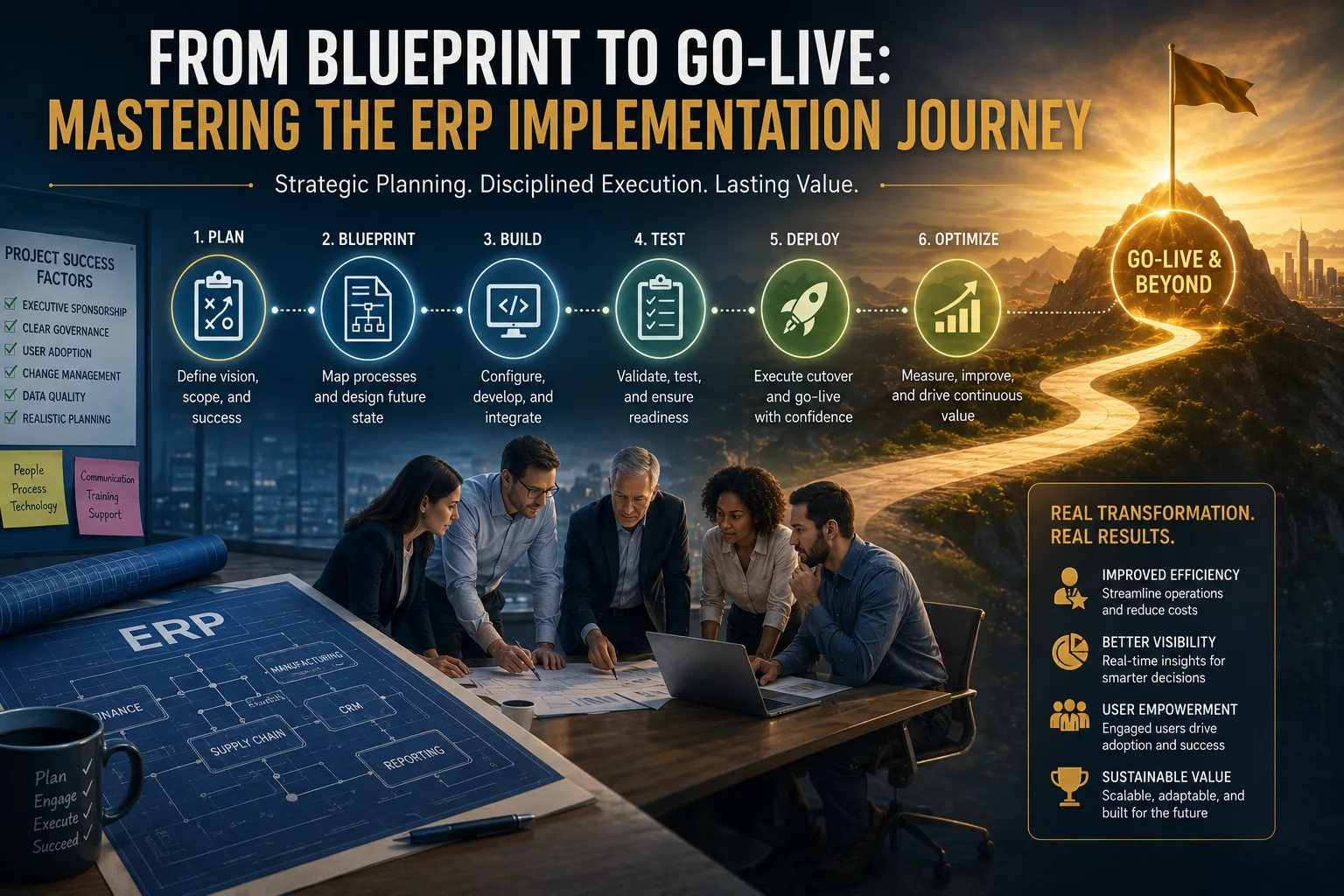
On this page
01The project that changes everything
ERP implementation is unlike any other project. It touches every department, disrupts every process, and challenges every assumption about how the organization operates. It requires coordinating hundreds of people across multiple locations, managing millions of dollars of budget, and delivering on an aggressive timeline — all while keeping the business running.
For project managers and implementation leaders it is the ultimate test of skill, judgment, and resilience. The complexity is staggering: technical challenges intersect with organizational politics, vendor management collides with change resistance, and scope creep threatens to derail carefully laid plans. A single misstep can cascade into failure.
Yet some implementations succeed spectacularly. They land on time and on budget, deliver the promised benefits, and transform what the organization is capable of. The difference between success and failure is not luck. It is disciplined project management, effective governance, and relentless focus on the factors that actually matter.
What follows is written for the people who will lead these programs — project managers, program directors, and implementation consultants — and it follows the journey in the order you will live it.
The six phases of the journey
- 01Plan — define the vision, the scope, and what success will be measured against.
- 02Blueprint — map current processes and design the future state.
- 03Build — configure, develop, and integrate.
- 04Test — validate the build and prove readiness at production volumes.
- 05Deploy — execute cutover and go-live.
- 06Optimize — measure, improve, and drive continuous value.
Every discipline below cuts across all six. Governance decides how fast the phases move, methodology decides how they are run, and scope, resources, vendors, and training decide whether the last two phases are a controlled landing or a scramble.
02Project governance: the foundation everything builds on
Why governance matters more than it appears to
Project governance is not bureaucracy. It is the decision-making framework that lets an organization act quickly and effectively when challenges arise — and challenges always arise.
Most ERP projects establish governance that looks good on paper and fails in practice. A steering committee is formed, meeting schedules are set, escalation procedures are documented. Then reality hits: the committee meets quarterly when weekly decisions are needed, members lack the authority to commit, and escalations disappear into organizational black holes. Critical decisions get delayed, conflicts fester, and the project loses momentum. By the time the governance failure is obvious, the project is already in trouble.
Implementing an ERP system is highly complex and often leads to failure. Challenges include lack of upper management involvement and commitment, insufficient experience, miscalculation of required resources, organizational politics, communication breakdowns, lack of ownership, and inadequate end-user involvement.
The elements that make governance real
- Clear decision rights
- Who can decide what? What requires steering committee approval versus the project manager’s own authority? Ambiguity here creates both bottlenecks and conflict.
- Appropriate frequency
- Governance has to match project velocity. During planning, design, testing, and cutover, weekly steering committee meetings may be necessary. Quarterly meetings cannot govern a program that needs decisions every week.
- Right representation
- Senior leaders with the authority to commit, not delegates who must check with their boss. Business leaders should outnumber technical experts.
- Accountability mechanisms
- Decisions documented, assigned, and tracked, and commitments enforced. Without accountability, governance becomes theater.
- Escalation procedures
- Fast, unambiguous paths for issues that cannot be resolved at the project level, with escalations addressed in days rather than weeks.
The steering committee that actually steers
An effective steering committee operates unlike a typical corporate committee.
- Composition — the CEO or COO as chair, with the CFO, the heads of the major business units, the CIO, and the project sponsor. No more than eight to ten members, so real discussion is possible.
- Frequency — weekly or biweekly through the critical phases, monthly through the quieter ones, adjusted to what the project actually needs.
- Agenda — decisions, not status. Status is distributed in advance; meeting time is for resolving issues and removing obstacles.
- Decision-making — consensus where it is available, and the chair deciding where it is not. Decisions are binding and documented.
- Accountability — every meeting opens on the action items from the last one, and leaders who did not deliver are held to it.
03Methodology: waterfall, agile, or hybrid?
ERP implementations have traditionally followed waterfall: sequential phases of requirements, design, development, testing, and deployment. Agile approaches have since gained ground, promising faster delivery and better adaptation to change. The reality is more nuanced than either camp allows.
- What waterfall gets right
- Structure and predictability. Requirements are documented comprehensively, designs are reviewed and approved, testing follows a systematic plan. For organizations that need detailed planning and formal approvals, waterfall provides real comfort.
- Where waterfall breaks
- Requirements evolve as users see the system and understand the implications. By the time testing reveals the problem, fundamental change means derailing the schedule. The rigidity that was an asset in planning becomes a liability in delivery.
- What agile gets right
- Iterative delivery, continuous feedback, and adaptation to changing requirements. For custom development the benefits are well established.
- Where agile breaks
- ERP implementation is not custom development. It is the configuration and integration of packaged software, and complex integrations need detailed specifications that “working software over comprehensive documentation” does not produce. Agile’s flexibility can enable scope creep rather than control it.
The hybrid that works
Most successful implementations combine waterfall structure with agile execution.
- Waterfall for structure — phases, governance, and major milestones, giving executives and stakeholders the predictability they need.
- Agile for execution — short sprints, continuous feedback, and iterative refinement inside each phase.
- Formal gates — clear entry and exit criteria at each phase boundary, giving the steering committee genuine decision points and preventing premature progression.
- Continuous testing — testing throughout rather than banked up at the end, so issues surface while they are still cheap to fix.
04Scope creep: the silent project killer
Scope creep does not announce itself. It arrives in small increments: “while we are implementing this module, we should also…”, or “this is really a must-have, not a nice-to-have”, or “it is just a small change”. Each increment seems reasonable. Collectively they destroy projects.
How it gets in
- Unclear initial scope
- Projects that begin without documented scope are vulnerable from day one. When scope is not explicitly defined, everything looks in scope.
- Weak change control
- Without rigorous change control, additions slip in through informal conversations and undocumented commitments.
- Stakeholder pressure
- Business leaders who were not adequately involved in scoping discover their requirements late and insist they are critical. Without strong governance, those demands simply become scope.
- Gold-plating
- Teams add functionality beyond requirements believing they are adding value. It consumes time and budget without delivering what was actually asked for.
- Vendor encouragement
- Vendors may encourage additions, particularly billable ones. “We can do that” quietly becomes “we should do that”.
The scope management framework
- Comprehensive initial scoping
- Invest heavily up front, and document what is out of scope as carefully as what is in it.
- Formal change control
- Every change, regardless of size, is documented, assessed for schedule, budget, and risk impact, and approved by the steering committee.
- A change budget
- Typically 10 to 15 percent of project budget, set aside for approved changes. When it is exhausted, further changes need new funding — which makes the trade-off visible to the people making it.
- Scope prioritization
- Maintain a prioritized backlog. Requests join the backlog and compete with everything already in it; only the top items are approved.
- A Phase 2 parking lot
- A real list for legitimate requirements that are not critical to initial go-live. It acknowledges the requirement while protecting Phase 1 — and it has to be real, or nobody will accept it twice.
- Stakeholder communication
- Regular reporting on scope status, approved changes, and what those changes did to schedule and budget.
Key challenges in ERP implementation include underestimating project scope and complexity, poor planned implementation, and the need for effective communication and managing stakeholder expectations.
05Resource planning: the key-person risk
ERP implementations need the organization’s best people — the ones who deeply understand the business processes, have credibility with stakeholders, and can bridge business and technology. They are precisely the people the organization can least afford to lose from operational roles.
The resource dilemma
- Use the best people
- They do excellent work and their operational roles suffer for it. Business units resist releasing them, and when they do relent, the backfill is inadequate.
- Use whoever is available
- The project gets people who are not in critical roles, often for a reason. It then struggles with inadequate expertise and, just as damaging, inadequate credibility.
- Rely on consultants
- External specialists bring ERP expertise but lack organizational context and process knowledge, and knowledge transfer back to internal teams is often thin.
Most projects end up with some of all three, producing a team with gaps in expertise, availability, and organizational knowledge at the same time.
The resource strategy that works
- Identify the resources you need during planning, and negotiate the commitments with business unit leaders as part of project approval — not after kickoff.
- Plan and fund backfill for critical operational roles, whether that is temporary staff, contractors, or internal transfers.
- Phase engagement so resource demand matches the phase, letting some people retain part of their operational role.
- Build explicit knowledge transfer into the plan on consultant-heavy teams: pair consultants with internal staff and have internal staff lead with support rather than watch.
- Name the key-person risks and mitigate them deliberately — cross-training, documentation, retention incentives.
- Protect team stability. Pulling people back when operational pressure rises destroys momentum and institutional knowledge, and it is rarely a net gain.
06Vendor management: partnership or adversarial?
These programs involve a web of vendor relationships — the software vendor, the implementation partner, infrastructure providers, specialist consultants — and managing them is a project discipline in its own right.
Where vendor management fails
- Unclear roles
- Ambiguity about who owns what creates gaps and conflict, and “I thought you were doing that” becomes a recurring line in status meetings.
- Inadequate contract terms
- Contracts that do not define deliverables, acceptance criteria, and remedies for non-performance leave the client with little recourse when a vendor underdelivers.
- Passive management
- Treating vendors as partners without accountability produces poor results. Vendors respond to incentives, and where there is no consequence for poor performance, performance slips.
- Over-reliance
- Deferring to vendor expertise without maintaining independent judgment produces bad decisions. Vendors have their own interests, and they do not always align with the client’s.
- Adversarial relationships
- The opposite failure. Vendors who feel mistreated become uncooperative exactly when collaboration matters most.
The framework
- Contracts that specify deliverables, acceptance criteria, timelines, and remedies. Ambiguity benefits the vendor, not the client.
- Regular vendor governance with real agendas, documented decisions, and tracked action items.
- Objective performance metrics — deliverable quality, timeline adherence, responsiveness, and the effectiveness of knowledge transfer.
- Escalation paths for performance issues, with defined response times and stated consequences.
- Firm on accountability, collaborative on problem-solving. Both halves of that sentence matter.
- Explicit knowledge transfer requirements. A good partner is building your internal capability, not your dependency.
07Training and adoption: where benefits are won or lost
Inadequate training is one of the most consistently identified causes of ERP failure in the research literature. It is also, just as consistently, treated as a cost to minimize rather than an investment in benefit realization.
Users who do not understand the system cannot use it well. They build workarounds, make errors, and never touch most of what was implemented. The expensive new platform becomes a glorified data entry tool and the promised benefits never appear. Training is not only about system mechanics — it is about the process change, the new way of working, and how each role now contributes to the outcome.
The training strategy that works
- Role-based
- Generic training is ineffective. Tailor it to the specific role, covering the processes and transactions that person will actually run.
- Hands-on
- Lecture-style training is forgotten quickly. People need practice in realistic scenarios with production-like data.
- Timed correctly
- Too early and it is forgotten by go-live; too late and users are unprepared. Two to four weeks before go-live, with a refresher immediately before cutover.
- Tiered
- Train super-users intensively and have them support their peers. It creates a support network and leaves expertise inside the business.
- Documented
- Role-based quick reference guides, process flows, and answers to the common questions, available after the classroom closes.
- Continued past go-live
- Ongoing support, refreshers, and a plan for training new hires. Adoption decays without it.
Inadequate training and education emerge as primary causes of ERP implementation failure. Users who lack proper training experience frustration, develop negative attitudes toward the system, and fail to use ERP functionality effectively, undermining the potential benefits of the implementation.
Training enables adoption but does not guarantee it
- Consistent, visible executive messaging about why the change is necessary and what it does for the organization.
- Change champions in each business unit, empowered to influence peers and model the behavior you want.
- Incentives and performance metrics aligned with the new way of working. What gets measured and rewarded gets done.
- Early wins identified and communicated, because demonstrated value converts skeptics faster than argument.
- Feedback channels where users can raise concerns and see them addressed. People who feel heard engage.
- Resistance addressed directly — understand the root cause, fix the legitimate part, and hold the rest accountable.
08Data cutover: the weekend that defines success
Cutover is the most critical and most stressful phase of the program. Everything converges: data migration, final configuration, integration activation, and the user transition. A single failure can force a rollback, delaying go-live and damaging credibility that took months to build.
What belongs in the cutover plan
- An hour-by-hour timeline covering every activity, with dependencies, named owners, and duration estimates.
- Data migration procedures for extract, transform, and load, with validation checkpoints at each stage.
- Final configuration, security setup, and integration activation steps, written to be executed rather than interpreted.
- Validation procedures for migrated data, system functionality, and integration operation — with go/no-go criteria agreed in advance.
- Rollback procedures, including who has the authority to call it and what triggers the call.
- A communication plan for stakeholders, users, and customers covering timing, expected impact, and where to get help.
- Hypercare staffing lined up, with escalation paths and issue tracking ready before the first ticket arrives.
The rehearsal
Cutover should hold no surprises, and that requires a full dress rehearsal: complete execution of every procedure in a production-like environment at production data volumes, two to four weeks before the real thing so there is time to fix what it finds.
Validate the rehearsal against expected outcomes and investigate every discrepancy rather than explaining it away. Capture the lessons systematically and update the procedures. Then make the go/no-go decision formally, on the evidence: if critical issues remain unresolved, the right answer is to move the date.
09Hypercare: the critical first 90 days
Go-live is not the end of the project. It is the beginning of benefit realization, and the first 90 days decide whether operations stabilize and users gain confidence or the organization starts building workarounds it will keep for a decade.
- Intensive support
- Significantly elevated staffing for the first 30 to 90 days, on site, visible, and immediately available. Remote-only support in week one is a false economy.
- Issue triage
- Rapid classification into business-stopping, significant, workaround-available, and minor — so the response matches the impact.
- Response commitments
- Published response times per category. Critical issues get immediate attention; low-priority items are queued honestly rather than promised and forgotten.
- Issue tracking
- Every issue tracked with status visible to stakeholders. Issues that are not tracked do not get resolved.
- Root cause analysis
- For anything recurring or significant, fix the cause rather than reapplying the workaround.
- A knowledge base
- Common issues and their resolutions written down, so users can self-serve and the support queue shortens over time.
After stabilization comes optimization
- Process refinement — find and fix the inefficiencies, bottlenecks, and pain points that only surface in live operation.
- System optimization — performance tuning, configuration refinement, and removing the workarounds adopted during hypercare.
- Training reinforcement — extra help for those struggling, advanced training for power users, and a repeatable path for new hires.
- Benefit tracking against the business case, with corrective action where the gap is real.
- Continuous improvement governance, so enhancements and process changes have a route that does not require a new program.
10Measuring success: beyond on time and on budget
Most organizations measure implementation success with traditional project metrics: on time, on budget, scope complete. Those are necessary and nowhere near sufficient. A project can hit all three and still fail to deliver business value — users trained but not adopting, processes implemented but not improved, integrations functional but not performant.
- Adoption
- Usage rates, transaction volumes, feature utilization. Are people actually using the system as intended?
- Process
- Cycle times, error rates, how much manual intervention remains. Are the processes measurably better?
- Business outcomes
- Inventory turns, order fulfillment times, financial close cycle time. Is the business performing differently?
- User satisfaction
- Survey results, support ticket volumes, training requests. Both the sentiment and the signals underneath it.
- Benefit realization
- Actual benefits against business case projections, reported honestly, including where they fall short.
- System performance
- Response times, availability, integration reliability. Adoption erodes quickly when the system is slow.
Making benefit measurement real
Baseline the metrics before implementation, because improvement cannot be measured against a number nobody captured. Track them systematically afterward and report them on a regular cadence. Distinguish ERP-driven improvement from everything else happening in the business, rather than claiming credit for the market. Where benefits fall short, run a gap analysis and act on it. Benefit realization is a continuing discipline, not a one-time measurement taken when the program closes.
11From blueprint to business value
ERP implementation is a journey of extraordinary complexity, and every element matters: governance that enables rapid decisions, a methodology that balances structure with flexibility, controlled scope, resourcing that survives operational pressure, vendors held to account, real investment in training and adoption, a meticulously rehearsed cutover, intensive support after go-live, and measurement that looks past on time and on budget.
The difference between the implementations that succeed and the ones that fail is not luck or circumstance. It is execution. Organizations that bring discipline to the work, invest in the capabilities that matter, and keep their focus on business outcomes rather than technical deliverables do achieve transformative results.
The journey from blueprint to go-live is hard. Done with discipline, it ends somewhere worth the investment and the effort.